3 Evaluation
This guide covers local evaluation for getting started. For large-scale evaluation (running many routes in parallel), see the SLURM Evaluation Guide.
Note
Dataset download is not required for CARLA evaluation—only a trained model checkpoint is needed.
Important
LEAD must be installed as a package in your Python environment. Ensure you’re in the correct environment before running evaluations.
3.1 Overview
The Quick Start tutorial demonstrates evaluating a trained policy on a single Bench2Drive route. We provide a unified Python-based evaluation interface (lead) that simplifies debugging and configuration for the three most popular benchmarks:
Bench2Drive: See official repository for benchmark details
Longest6 v2: See carla_garage for benchmark details
Town13: See CARLA Leaderboard 2.0 validation routes
Warning
Do not evaluate Longest6 v2 or Town13 routes using Bench2Drive’s evaluation repository—the metrics definitions differ.
3.2 Running Evaluations
3.2.1 Prerequisites
Activate your Python environment where LEAD is installed
Start CARLA server:
1bash scripts/start_carla.sh
3.2.2 Direct Python Invocation
The simplest way to run evaluations is directly with Python:
Model evaluation (Longest6/Town13):
1python -m lead \
2    --checkpoint outputs/checkpoints/tfv6_resnet34 \
3    --routes data/benchmark_routes/Town13/0.xml
Bench2Drive:
1python -m lead \
2    --checkpoint outputs/checkpoints/tfv6_resnet34 \
3    --routes data/benchmark_routes/bench2drive/23687.xml \
4    --bench2drive
Expert mode (data generation):
1python -m lead \
2    --expert \
3    --routes data/data_routes/lead/noScenarios/short_route.xml
3.2.3 Configuration Options
Evaluation behavior is controlled by config_closed_loop.py. Key settings:
produce_demo_video- Generate bird’s-eye view visualization videosproduce_debug_video- Generate detailed debug videos with sensor dataproduce_demo_image- Save individual demo framesproduce_debug_image- Save individual debug frames
Disable video generation for faster evaluation:
1export LEAD_CLOSED_LOOP_CONFIG="produce_demo_video=false produce_debug_video=false produce_demo_image=false produce_debug_image=false"
The LEAD_CLOSED_LOOP_CONFIG environment variable allows per-run configuration overrides without modifying the config file.
3.2.4 Output Structure
Each evaluation produces:
outputs/local_evaluation/<route_id>/
├── checkpoint_endpoint.json      # Leaderboard 2.0 metrics and results
├── metric_info.json              # Bench2Drive extended metrics (Bench2Drive only)
├── demo_images/                  # Bird's-eye view frames
├── debug_images/                 # Debug visualization frames
├── <route_id>_demo.mp4          # Bird's-eye view video
├── <route_id>_debug.mp4         # Debug video with sensor data
└── debug_checkpoint/             # Debug checkpoints
3.3 Summarizing Results
3.3.1 Longest6 v2 and Town13
After completing all routes, aggregate results using the result parser:
Longest6 v2:
1python3 scripts/tools/result_parser.py \
2    --xml data/benchmark_routes/longest6.xml \
3    --results <directory_with_route_jsons>
Town13:
1python3 scripts/tools/result_parser.py \
2    --xml data/benchmark_routes/Town13.xml \
3    --results <directory_with_route_jsons>
This generates a summary CSV containing:
Driving score (DS)
Route completion (RC) percentage
Infraction breakdown (collisions, traffic violations, red lights, etc.)
Per-kilometer statistics
3.3.2 Bench2Drive
Bench2Drive provides extended metrics beyond standard Leaderboard 2.0 metrics. See the official evaluation guide.
Bench2Drive evaluation tools are located at 3rd_party/Bench2Drive/tools/.
3.4 Best Practices
3.4.1 1. Environment Setup
Always run evaluations with:
LEAD installed as a package in your active Python environment
Optional:
LEAD_PROJECT_ROOTenvironment variable set to your workspace rootCARLA server running on the expected port (default: 2000)
With sufficient compute (16-32 GTX 1080 Ti GPUs):
Longest6 v2: ~1 day for 3 seeds (36 routes × 3 = 108 evaluations)
Town13: ~2 days for 3 seeds (20 routes × 3 = 60 evaluations)
Approximately 90% of routes complete within a few hours. Disable video/image generation to accelerate evaluation.
3.4.2 2. Restart CARLA Between Routes
Running multiple routes on the same CARLA instance can cause rendering bugs (example from Bench2Drive paper):
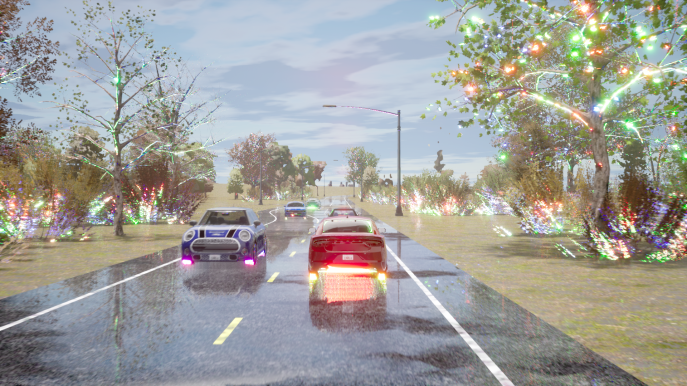
Restart CARLA between routes:
1bash scripts/clean_carla.sh  # Kill CARLA processes
2bash scripts/start_carla.sh  # Start fresh instance
The pipeline loads all three checkpoint seeds as an ensemble by default. If GPU memory is limited, rename two checkpoint files temporarily so only one seed loads.
3.4.3 3. Use Correct Evaluation Tools
Longest6 v2 and Town13: Evaluate using standard leaderboard setup
Bench2Drive: Must evaluate using Bench2Drive’s code—otherwise results are invalid
3.4.4 4. Account for Evaluation Variance
CARLA is highly stochastic despite fixed seeds. Results vary between runs due to traffic randomness and non-deterministic simulation factors.
Recommended evaluation protocols:
Minimum (standard practice): Train 3 models with different seeds, evaluate each once → 3 evaluation runs total
Optimal (for publications): Train 3 models with different seeds, evaluate each 3 times → 9 evaluation runs total
Our research group uses the minimum protocol.